ADMISSIONS

Your Path to Seacoast, Step by Step

A Christ-centered school with small classes where every child is known by name — preschool through 12th grade, all on one campus. Joining is simple: choose your track below and follow the steps. We’ll get you on campus fast, often within days.
Students Walking in Seacoast Campus

K–12 or Preschool?

Admissions works a little differently for each. Tap your track below to see the steps.

↔ Tap either option to switch tracks

Three phases take your student from first hello to first day. Here’s exactly what happens at each one.
1

Submit Your Inquiry

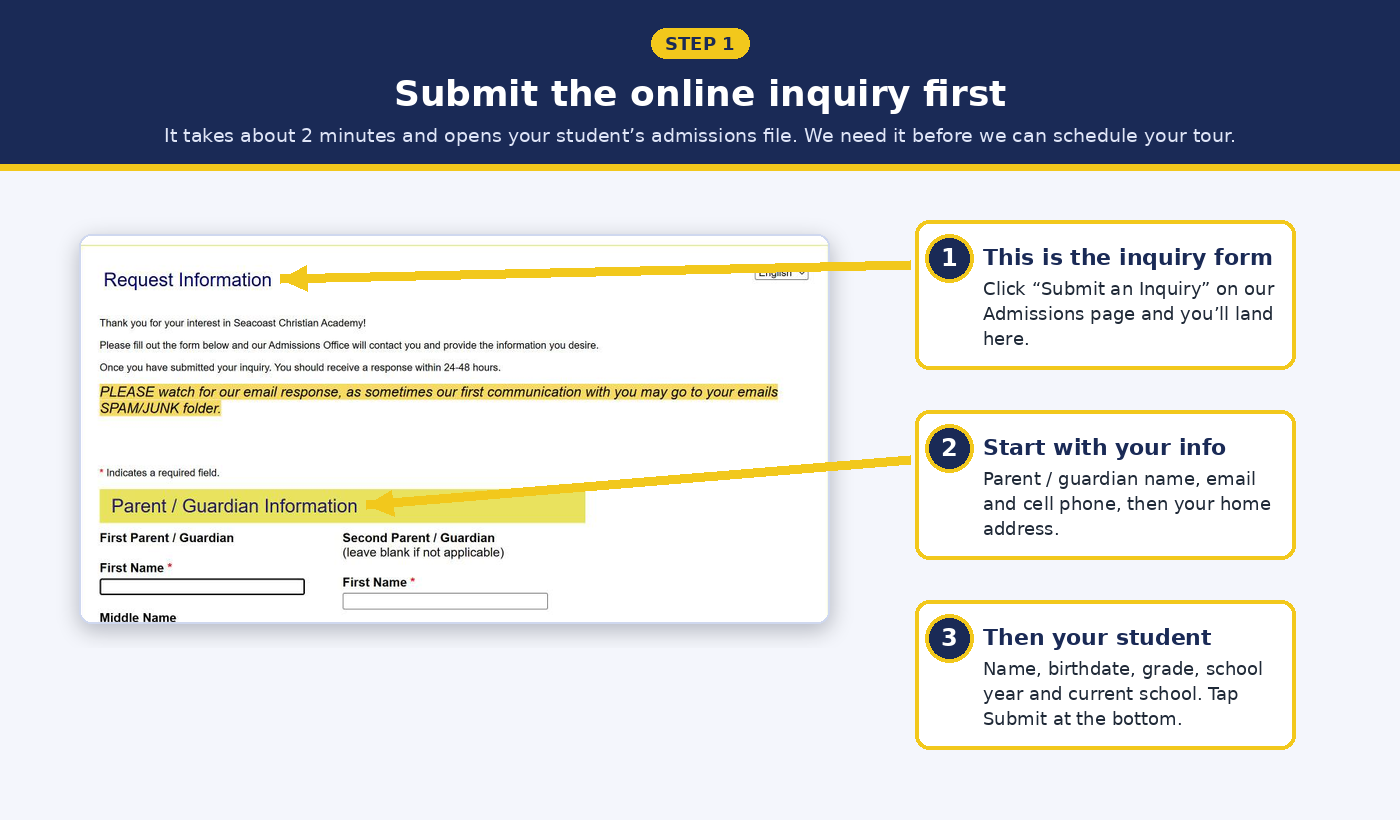
Every Seacoast family starts here. Submit our short online inquiry — it takes about two minutes and opens your student’s admissions file, so everything for your family stays in one place. You’ll also see an estimate of tuition and fees, and the forms you’ll need along the way.

How to fill out the Seacoast online inquiry form: parent information, then student information, then Submit.
2

Send Records, Then Tour

Next, upload your student’s most recent standardized test scores (the most important piece), plus the last two years of report cards (transcripts for grades 9–12) and an IEP or similar if your student has one. Photos or parent-portal printouts are fine, and you can send several files at once. Homeschool families can upload a letter or printout of grades from the homeschool teacher.

Once we have them, we’ll schedule your campus tour (Monday–Friday, 9:00 a.m.–2:00 p.m.), and Mrs. Mariotti will meet with your student during the visit. If recent test scores aren’t available, we’ll arrange placement testing (Renaissance Math & Reading) on campus. We’ll follow up with our admissions decision.

3

Complete Your Enrollment

Approved — now let’s make it official. We’ll ask for a teacher recommendation and a church recommendation, and send you the enrollment application in FACTS. Your student’s seat is secured once you’ve:

  • submitted the application ($22 fee)
  • provided your scholarship information
  • sent all requested documents and recommendations
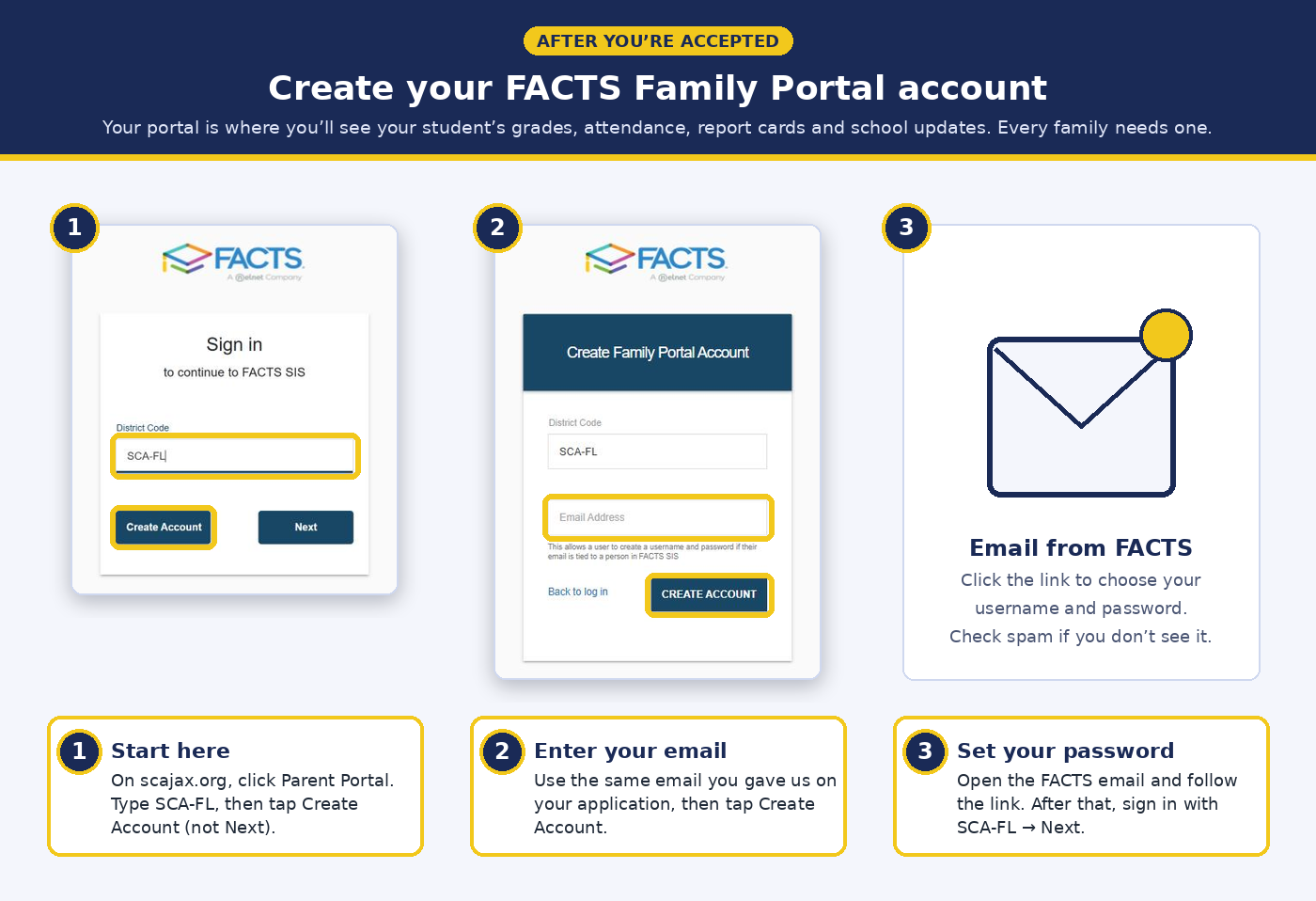
  • set up your FACTS Family Portal
  • submitted your financial agreement
How to create a FACTS Family Portal account: click Parent Portal, enter district code SCA-FL and tap Create Account, enter the email from your application, then follow the link FACTS emails you to set your password.
Wondering about cost? Most Seacoast families use a Florida school-choice scholarship — Step Up for Students (FTC, FES, FES-UA) or AAA — and our Variable Tuition program can adjust cost to your family’s situation. See tuition & scholarships →

↔ Tap either option to switch tracks

Getting your little one started is easy — here’s how it works.
1

Reach Out

The easiest way to start is to say hello. Email our preschool office or give us a call, and we’ll help you find a great time to come see us.
2

Tour Our Preschool

Come see our classrooms in action, meet the teachers who’ll love on your child, and picture your little learner here. Just tell us the day that works best and we’ll set up your visit.
3

Enroll With Our Help

We’ll walk you through registration and help you explore Early Learning Coalition (ELC) scholarships and funding that can lower your cost. Our full-day program gives your child a complete day of learning, play, and care — ideal for working families.
Start here, stay here. Seacoast goes all the way through 12th grade on one campus — your child can grow up here, with no school-switching stress at kindergarten or beyond.

Not sure where to start?

Call the right office and a real person will walk you through it.
K–12 Admissions
Preschool Office

Documents & Policies

Everything you’ll want to read before enrolling, in one place.